Click a name. It's all there.
Orbita sorts your mail by people, not by mailboxes: every message, every conversation, every attachment, across all your accounts. For Mac and iPhone.
Coming to the App Store
For Mac and iPhone. One purchase, both devices. 30 days of the full feature set from first launch.
Let me know when it's out.Works with Gmail, Microsoft 365 and Outlook.com, iCloud (with an app-specific password) and IMAP. As many accounts as you like.
Every mailbox thinks in folders. You think in people.
On the left, the timeline: all messages from all accounts in chronological order, like any mailbox. On the right, the same messages sorted by people. Both are Orbita; you switch with ⌘1 and ⌘2.
When a VIP writes to you, they move to the top. Newsletters and invoices don't disappear, they are just one line in the list instead of twenty in your inbox.


You know who. Not where.
One message from Katrin Hofmann sits in your work account, the next one in the other, and the rest somewhere in between. You know exactly who sent it, and you still search.
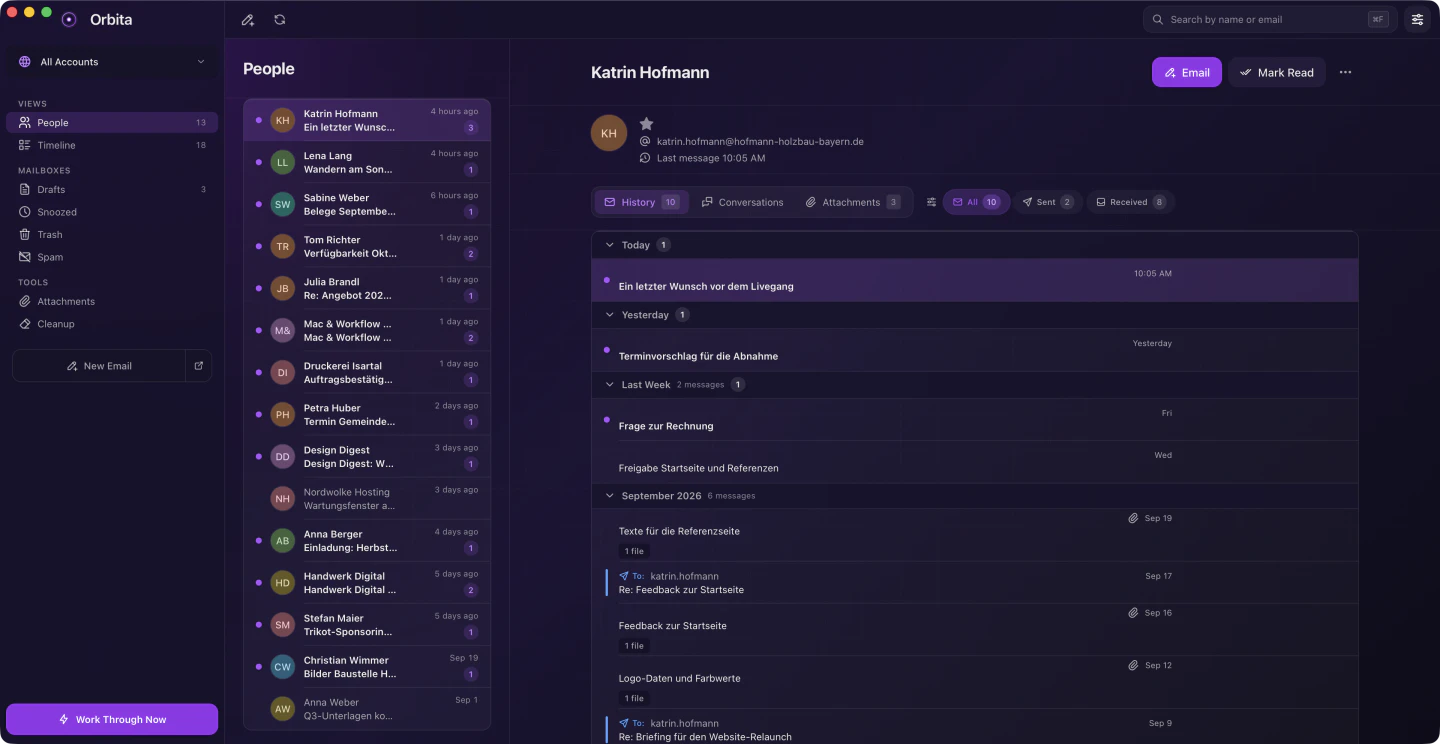
In Orbita you click the name. Orbita sorts your mail by people, not by folders and accounts. Click a name and you see every message from and to that address in one timeline, across all your accounts. Your sent replies sit in between, where they belong. Reply chains sit with the person as one conversation, even when the messages came through different accounts. Separate private and work with one switch.

The PDF was in some email.
You need the logo Katrin sent. You no longer know which message, which subject, which account.
Every person has their history, conversations and attachments side by side. You don't hunt for the email with the PDF anymore: click the name, then Attachments. Logo, homepage draft, reference list: three files, one view.
And if you can't remember who sent it: under Attachments, every file from all accounts is in one place. Identical attachments are grouped, with a jump to every email they came in. Filter by type and date range on the Mac.

Work through now: one person at a time, down to zero.
You scroll, open, close, and in the evening the same counter is still there.
Work through now walks you through everything unread, one person at a time. One decision per person: done, snooze, delete or next. You see how far you are, and at the end you get a completion screen with your tally.
On the Mac, start with ⌘G. D for done, S to snooze, X to delete, right arrow for the next person. The video shows one run through the demo mailbox, just under a minute, no sound. The recording shows the German interface, with English subtitles.

And if Orbita is gone in three years?
Anyone switching from Apple Mail rightly asks what happens if the new client disappears. Postbox, OnMail and Skiff were discontinued. Notion Mail shuts down on 22 September 2026.1
Your mail lives in a database on your Mac and iPhone, your credentials in the keychain. There is no Orbita server your mail passes through. If Orbita ever shuts down, you lose nothing: your mail stays with your provider and on your device. Reading and searching work without a connection because your mail is on the device. Attachments are fetched on demand.
Remote images and detected tracking pixels stay out until you allow them. Even for trusted senders, pixels stay blocked. Orbita fetches profile pictures so that Gravatar and logo services never see your address or IP. Only a hash or the domain goes to an Orbita service (api.orbita.email) you can switch off in Settings.
1 Sources on /en/sources.html.
Your accounts. Your Mac. Your iPhone.
Works with Gmail, Microsoft 365 and Outlook.com, iCloud (with an app-specific password) and IMAP. As many accounts as you like. Switching from Apple Mail is not a migration: you add your account, Orbita loads your mail in the background, your provider stays the source.
On the iPhone too: people, timeline and Work through now, with a swipe to the next person and attachments straight into the share sheet. One purchase covers Mac and iPhone.
On the Mac, new mail arrives immediately. On the iPhone, Orbita fetches in the background. Real push would need a server that stores your credentials. We are not building one.


Feels like a Mac.
Orbita is a Mac app: menu bar, Dock badge, menu bar icon with unread count, keyboard shortcuts.
On the Mac: ⌘K, type a name, Enter, and you are on that person. Quick search finds people, messages and attachments across all accounts.
The essentials run from the keyboard: ⌘K search, ⌘1 to ⌘7 sections, R, A, F, E in an open email, D, S, X in the focus session. Overview with ⌘/.

What else is in there
- Answer calendar invitations right inside the email: accept, tentative, decline. On the Mac, Orbita hands the event to your calendar app.
- Cleanup groups newsletters from all accounts by sender. Unsubscribe sender by sender, or send everything from them to the trash with one click.
- Mark important people as VIP. The mark applies to the person across all accounts, and if you want, Orbita only notifies you for VIPs.
- Rich-text editor, a signature per account, a reminder when you write “attached” without attaching. On the Mac, drag-and-drop attachments and a separate window for new mail. Drafts also land in your provider's Drafts folder.
- Trash, Spam, Snoozed, Drafts, Attachments and Cleanup are still there, plus your server folders for looking things up.

€49.99 once. Mac and iPhone.
30 days of the full feature set from first launch, no account, no purchase. Then read-only mode: reading stays, sending, syncing, moving, deleting and snoozing wait for the full version. You buy it in the app, €49.99 once, valid on Mac and iPhone with the same Apple ID. Your App Store shows the price for your country.
Buy once. All 1.x updates included. Version 2.0 will be a separate, optional purchase: existing customers pay half, and your 1.x keeps running.
The purchase runs through the App Store. No subscription, no credit card with us, no Orbita accounts.
Questions before you buy
What happens after the 30 days?
30 days of the full feature set from first launch, no account, no purchase. Then read-only mode: reading stays, sending, syncing, moving, deleting and snoozing wait for the full version. You buy it in the app, €49.99 once, valid on Mac and iPhone with the same Apple ID. Your mail stays with your provider and on your device either way.
Do I get push notifications on the iPhone?
On the Mac, new mail arrives immediately. On the iPhone, Orbita fetches in the background. Real push would need a server that stores your credentials. We are not building one.
Is there Orbita for Windows or Android?
No. Orbita is for Mac and iPhone. A Windows or Android version is not in the works, and we are not promising one.
Which accounts work, and which one does Orbita reply from?
Gmail, Microsoft 365 and Outlook.com, iCloud (with an app-specific password) and IMAP with TLS. As many accounts as you like. When you write to someone from their person view, Orbita preselects the account and address you last used for that person. You can change it before sending. A person in Orbita is one email address: if someone writes to you from two addresses, you see two entries in the list.
How do I move over from Apple Mail?
Add your account, done. Type your address; Gmail, Microsoft 365 and iCloud are recognised. Sign in with OAuth or an app password, folders are suggested, then Orbita loads your mail in the background. Your provider stays the source, nothing needs migrating. You can keep using Apple Mail alongside until you are sure. Trash, Spam, Snoozed, Drafts, Attachments and Cleanup are still there in Orbita, plus your server folders for looking things up.
Where is my data, and does Orbita phone home?
Your mail lives in a database on your Mac and iPhone, your credentials in the keychain. There is no Orbita server your mail passes through, no Orbita account and no usage analytics. On the Mac, back up your entire Orbita database as a ZIP. There are three connections, and a fourth only with your consent: Orbita fetches profile pictures so that Gravatar and logo services never see your address or IP; only a hash or the domain goes to an Orbita service (api.orbita.email) you can switch off in Settings. When you set up an account, Orbita asks via DNS (cloudflare-dns.com) whether your domain is Gmail, Microsoft 365 or iCloud. And Orbita verifies the purchase with Apple through the App Store. Only if you turn on crash reports in Settings does Orbita send error reports to our own server in Germany (errors.one-pixel-ahead.com); this is off by default. Details are in the privacy policy.
What will version 2.0 cost?
Buy once. All 1.x updates included. Version 2.0 will be a separate, optional purchase: existing customers pay half, and your 1.x keeps running. There is no date for 2.0.
Is there a light mode?
No. Orbita is dark throughout, on the Mac and on the iPhone, and does not follow the system setting. A light mode is not in the works. The screenshots on this page show the app as it is.
Who is behind Orbita?
One Pixel Ahead UG (haftungsbeschränkt), a small software company in Lalling, Lower Bavaria, Germany. No account with us, no subscription, no ads. The App Store handles purchase and updates. Company details are in the legal notice (German), questions to admin@one-pixel-ahead.com.
Built in Lower Bavaria.
Orbita is made by One Pixel Ahead UG (haftungsbeschränkt) in Lalling, Germany. No account with us, no subscription, no ads. The App Store handles purchase and updates.
Questions before you buy? Write to admin@one-pixel-ahead.com.
Coming to the App Store
For Mac and iPhone. One purchase, both devices. 30 days of the full feature set from first launch.
Let me know when it's out.